

MCP Server (Claude Desktop, Cursor, Cline, ...)
The cvefeed-mcp package lets any Model Context Protocol client — Claude Desktop, Cursor, Cline, Windsurf, or the official MCP Inspector — query CVEFeed.io directly. Ask natural-language questions and the agent runs real searches, pulls CVE details, inspects EPSS scores, manages project subscriptions, and reads alerts for you.
Tier requirement: Pro or Enterprise
The MCP integration is gated at token issuance — Free and Starter accounts can’t mint tokens that work with cvefeed-mcp. A token created on Pro that later gets downgraded stops working the instant the subscription changes, with no need to revoke anything.
Available tools
Section titled “Available tools”Once connected, the agent gets 13 tools backed by the CVEFeed REST API:
| Tool | Purpose | Required scope |
|---|---|---|
search_cves | Keyword + filter search over the CVE catalog | vulnerabilities:read |
get_cve_detail | Full metadata for a single CVE, optionally with change history | vulnerabilities:read |
run_cveql_query | Execute (or validate) a CVEQL threat-hunting query | vulnerabilities:write (POST endpoint) |
cveql_schema | Return CVEQL field/operator catalog | vulnerabilities:read |
lookup_by_cpe | Resolve a CPE 2.3 URI to matching CVEs, products, and vendors | vulnerabilities:read |
get_exploit_intel | Public exploits and EPSS scores for a CVE | vulnerabilities:read |
list_product_subscriptions | List products a project is subscribed to | subscriptions:read |
add_product_subscription | Subscribe a project to one or more products | subscriptions:write |
remove_product_subscription | Unsubscribe a project from products | subscriptions:write |
search_products | Product search with per-project subscription status flagged | subscriptions:read |
list_project_alerts | List vulnerability alerts, optionally unread only | alerts:read |
mark_alert_read | Mark an alert as read (logged to project activity) | alerts:write |
read_project_activity_log | Project audit log — who did what, when, from where | activity_log:read (Enterprise) |
Tool names mirror the published SKILL.md documents at /.well-known/agent-skills/ so the same capability surface is discoverable through either channel.
1. Create an MCP-enabled token
Section titled “1. Create an MCP-enabled token”Navigate to your project’s API Tokens page and open the Create New Token form.
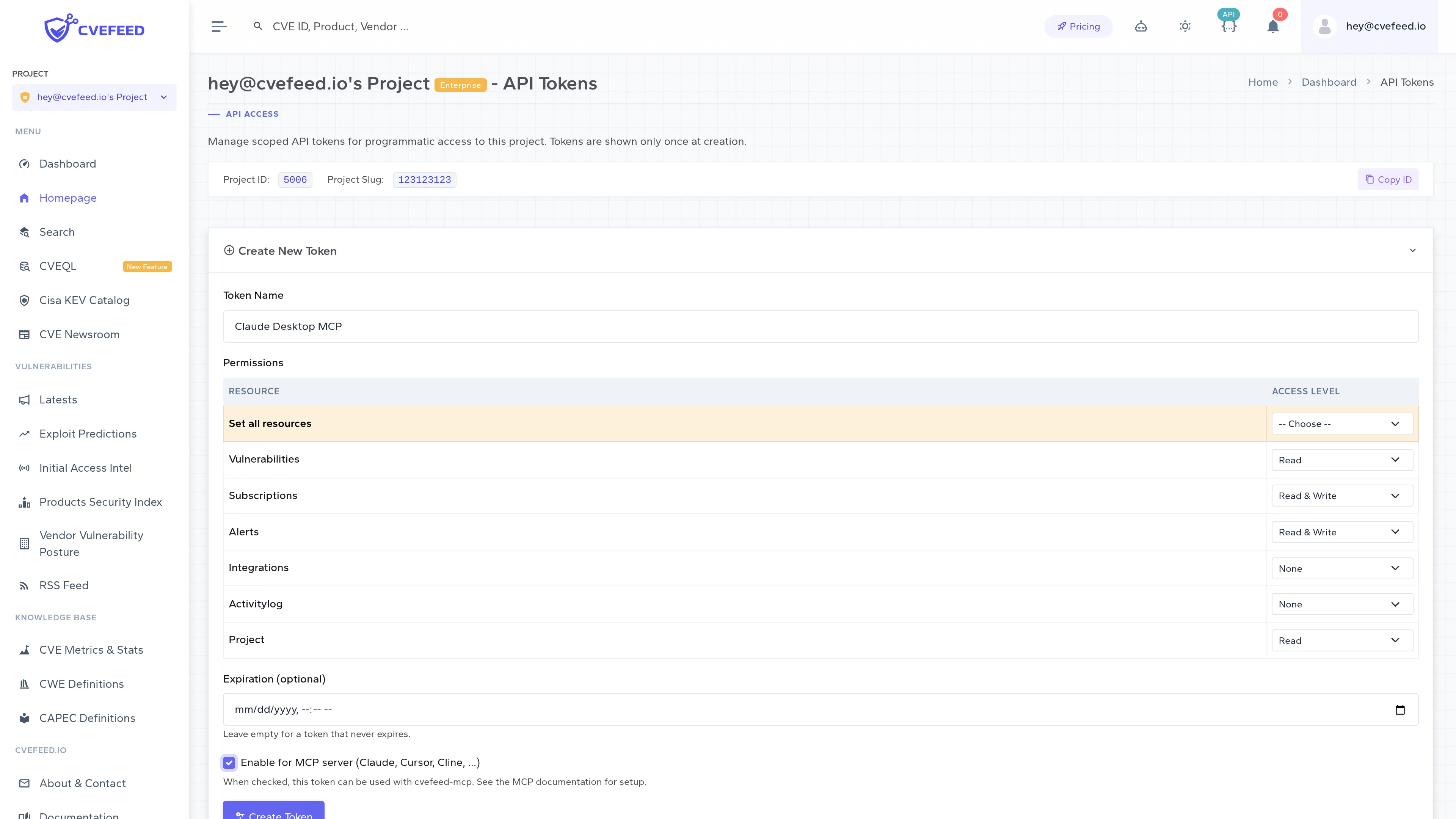
Give the token a name, pick scopes that match the tools you want the agent to use, and tick Enable for MCP server.
Recommended scopes for full MCP functionality
The tool table above lists the scope each tool needs. If you want every tool to “just work” without the agent hitting an “insufficient scope” error mid-task, grant at least these:
vulnerabilities: read— five of the six discovery tools:search_cves,get_cve_detail,cveql_schema,lookup_by_cpe, andget_exploit_intel. The sixth,run_cveql_query, needsvulnerabilities: write.subscriptions: read(orwriteto let the agent add / remove product subscriptions).alerts: read(orwriteto let the agent mark alerts as read).activity_log: read— Enterprise only; required byread_project_activity_log.
write implies read, so you don’t need to tick both on the same resource. There is one trap: the scope level a request is checked against is derived from its HTTP method, and run_cveql_query reaches CVEFeed over POST /api/cveql/search/ (or POST /api/cveql/validate/ when validate_only is set). Every non-GET request is checked against write, so a CVEQL-capable token needs vulnerabilities: write even though the query only reads data. A token that is read on every row above runs every other read-only tool, cveql_schema (a GET) included — but the same method rule applies to the three state-changing tools, so add_product_subscription, remove_product_subscription, and mark_alert_read still need write on their own resource, exactly as the table says.

On Free and Starter tiers the checkbox is disabled and replaced with an upgrade prompt — tokens created on those plans simply cannot be used with cvefeed-mcp:

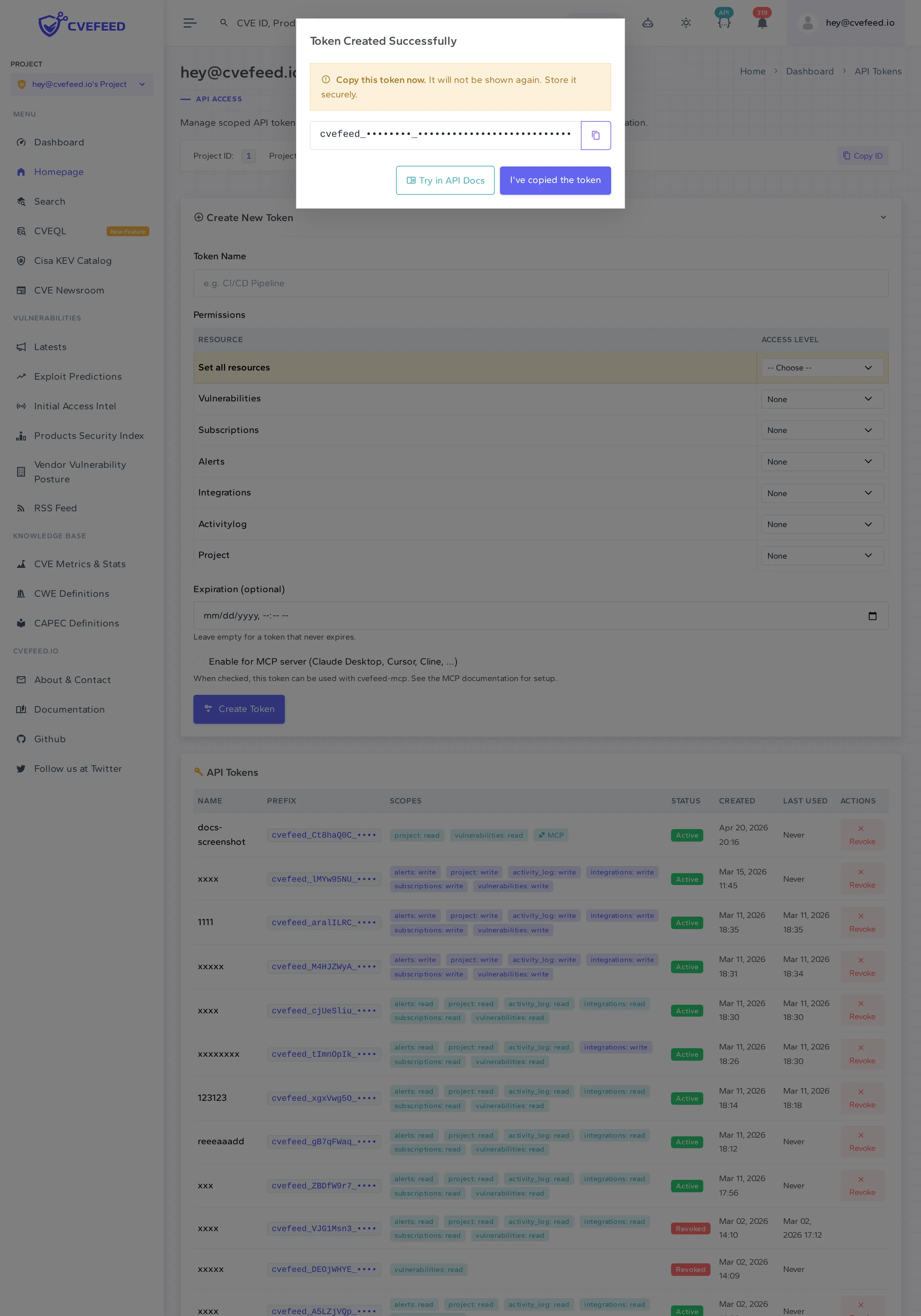
Click Create Token. The raw token is shown once in a modal — copy it before closing, it cannot be retrieved later.
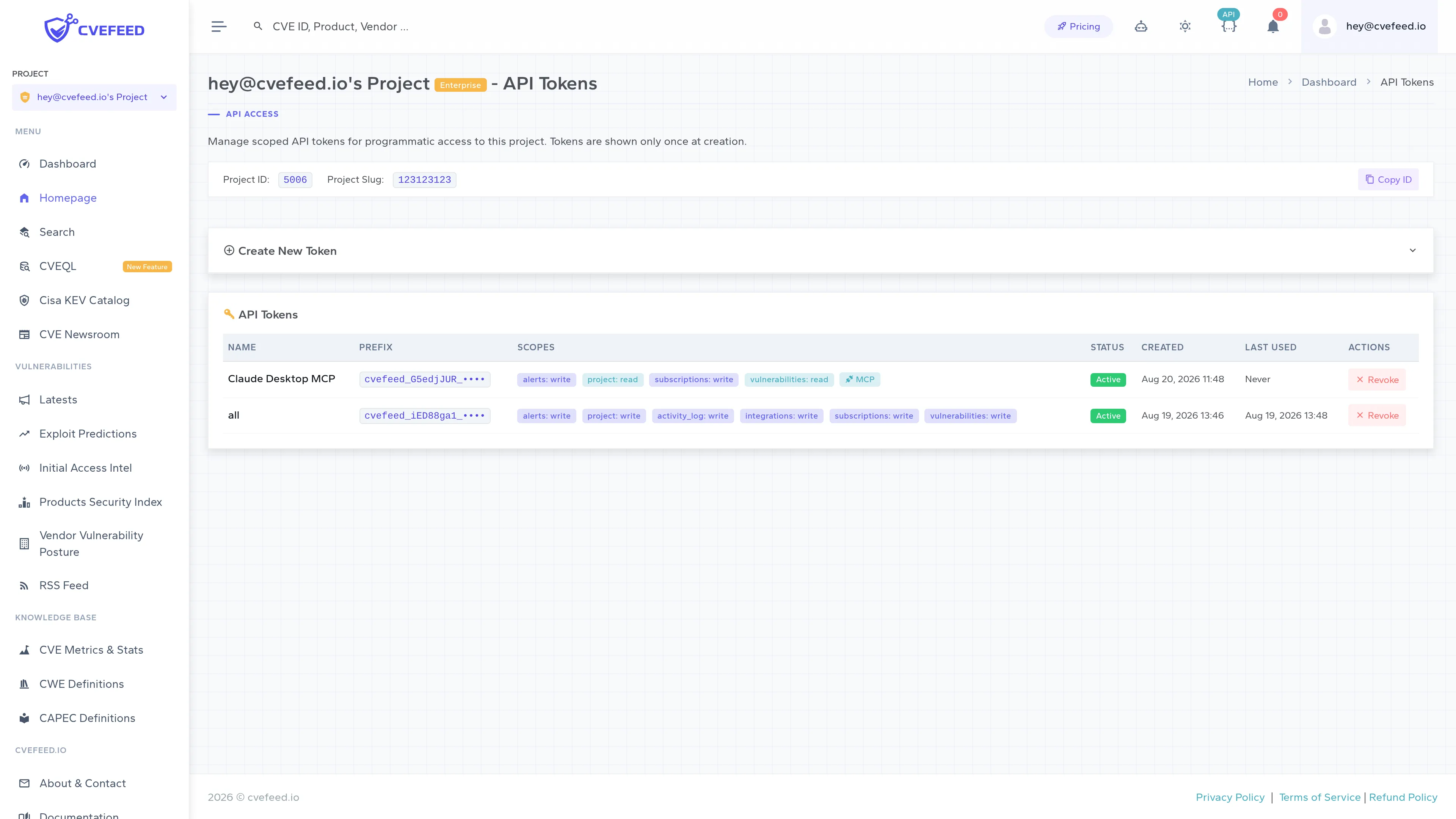
After dismissing the modal the token appears in the list with an MCP badge alongside its scope badges, so you can tell which of your tokens are MCP-capable.
2. Install cvefeed-mcp
Section titled “2. Install cvefeed-mcp”The easiest path is uvx, which installs and runs the server on demand without polluting your global Python environment — the client configs in step 4 all invoke it that way, so there is nothing to install by hand.
Or install it globally with pip:
pip install cvefeed-mcpEither way there is nothing to pass on the command line: cvefeed-mcp accepts no flags — there is no --help — and reads its entire configuration from CVEFEED_API_TOKEN, CVEFEED_PROJECT_ID, and CVEFEED_BASE_URL. Once you have a token and a project id you can smoke-test it by hand:
CVEFEED_API_TOKEN='cvefeed_XXXXXXXX_<secret>' \ CVEFEED_PROJECT_ID='42' \ uvx cvefeed-mcpWith a usable token it starts speaking MCP over stdio and waits for a client (Ctrl-C to stop). Otherwise it prints the reason on stderr and exits with one of the codes in Troubleshooting.
3. Find your project id
Section titled “3. Find your project id”Each token is bound to exactly one project, so cvefeed-mcp needs both the token and the numeric id of that project. It is on the same API Tokens page you created the token on: the quick-reference bar above the token list shows Project ID next to the project slug, with a Copy ID button. Don’t go hunting for it in the app’s URLs — project pages are addressed by slug (/project/detail/<your-project-slug>/), never by numeric id.
You’ll set it as CVEFEED_PROJECT_ID alongside the token in every MCP client config below.
4. Configure your MCP client
Section titled “4. Configure your MCP client”Each client has its own config format, but all of them need the same things: the command (cvefeed-mcp), the bearer token (CVEFEED_API_TOKEN), the project id (CVEFEED_PROJECT_ID), and optionally the base URL (CVEFEED_BASE_URL, defaults to https://cvefeed.io).
Claude Desktop
Section titled “Claude Desktop”Edit ~/Library/Application Support/Claude/claude_desktop_config.json on macOS, %APPDATA%\Claude\claude_desktop_config.json on Windows, or the equivalent on Linux:
{ "mcpServers": { "cvefeed": { "command": "uvx", "args": ["cvefeed-mcp"], "env": { "CVEFEED_API_TOKEN": "cvefeed_XXXXXXXX_<secret>", "CVEFEED_PROJECT_ID": "42" } } }}Fully quit Claude Desktop and restart. The CVEFeed tools will show up under the MCP surface.
Cursor
Section titled “Cursor”Cursor reads MCP servers from ~/.cursor/mcp.json:
{ "mcpServers": { "cvefeed": { "command": "uvx", "args": ["cvefeed-mcp"], "env": { "CVEFEED_API_TOKEN": "cvefeed_XXXXXXXX_<secret>", "CVEFEED_PROJECT_ID": "42" } } }}Cline / Continue / Windsurf
Section titled “Cline / Continue / Windsurf”Any client that follows the MCP spec config format will work — same command, args, env shape. See the client’s own docs for the file location.
MCP Inspector (debugging)
Section titled “MCP Inspector (debugging)”CVEFEED_API_TOKEN='cvefeed_XXXXXXXX_<secret>' \ CVEFEED_PROJECT_ID='42' \ npx @modelcontextprotocol/inspector uvx cvefeed-mcpThe Inspector UI gives you a click-through tool explorer for quickly smoke-testing your token.
5. Ask the agent
Section titled “5. Ask the agent”With the server connected, the agent can use natural language. All project-scoped tools implicitly target the project you configured, so you don’t have to mention it:
- “Find critical CVEs published in the last week that affect OpenSSL.”
- “What’s CVE-2024-6387 about and are there any exploits?”
- “Subscribe my project to the Kubernetes and PostgreSQL products.”
- “Show me my unread alerts — just the high-severity ones.”
- “Run CVEQL:
severity = "CRITICAL" and products.vendor.name ~ "microsoft" and published > "2026-01-01".”
The agent translates these into the tools above, calls them against CVEFeed.io with your token, and returns structured results.
Rate limits
Section titled “Rate limits”Most MCP tool calls count against the same per-project rate limit as the REST API:
| Tier | Requests per minute |
|---|---|
| Pro | 180 |
| Enterprise | 720 |
That bucket is keyed on the project rather than the token, so the agent shares it with your dashboard sessions and every other integration on the same project.
Two groups of tools are metered somewhere else:
search_cvescalls/api/vulnerability/advanced-search, which is throttled at a flat 30 requests per minute keyed by client IP. It is neither tier-aware nor project-scoped, and the bucket is shared with unauthenticated traffic from the same address — an agent that leans on broad catalog searches will hit this long before the table above.run_cveql_queryandcveql_schemadraw on the separate CVEQL budget: 30 requests per minute on Pro, 40 on Enterprise.
Everything else — get_cve_detail, lookup_by_cpe, get_exploit_intel, and all the project-scoped subscription, alert, and activity-log tools — uses the per-project bucket in the table above.
Whichever limit trips, the agent gets a 429 with a Retry-After header, and cvefeed-mcp raises an error naming the seconds to wait and pointing at the project owner’s tier.
Troubleshooting
Section titled “Troubleshooting”cvefeed-mcp preflights every startup against /api/projects/{project_id}/ and refuses to register tools when something’s wrong. Each failure mode exits with a distinct status code, so MCP-client logs tell you exactly what’s broken.
| Exit code | Meaning | Fix |
|---|---|---|
2 | CVEFEED_API_TOKEN is not set | Create a token and export it in the client config. |
3 | Token is invalid, expired, or revoked | Re-issue the token on CVEFeed.io. |
4 | Tier does not include MCP, or the token itself doesn’t have MCP enabled | The error message says which. Upgrade to Pro, or re-create the token with Enable for MCP server ticked. |
5 | Couldn’t reach the CVEFeed API, or CVEFEED_PROJECT_ID points at a project the token wasn’t issued for | Verify the project id matches the one the token was created under. |
6 | CVEFEED_PROJECT_ID is missing or non-numeric | Set it to the integer id of the project your token is bound to. |
”My token just stopped working”
Section titled “”My token just stopped working””The most common cause is a subscription change. MCP access is effectively:
effective_mcp = tier.features.mcp_access.enabled AND token.is_mcp_enabledThe API deliberately reports the two flags independently rather than a precomputed AND, so there is no derived state that can drift. If the project owner downgrades to Free or Starter, the left side flips to false immediately — every MCP-enabled token on their projects goes dormant without any revocation, and the flag flips back on if they re-subscribe to Pro.
”How do I check what tier my token is running under?”
Section titled “”How do I check what tier my token is running under?””Hit the project detail endpoint directly:
curl -H "Authorization: Bearer cvefeed_XXXXXXXX_<secret>" \ https://cvefeed.io/api/projects/42/The response includes tier.name, tier.features.mcp_access.enabled, and the token capability flag at token.is_mcp_enabled. AND the last two to get effective access. token is null for session-authenticated requests.
Security
Section titled “Security”- Tokens are shown once at creation and only a SHA-256 hash is stored server-side.
- Every call sends a
User-Agent: cvefeed-mcp/<version>header, but the server never stores it, so it is not something you can filter the activity log on. What the log does record is which token acted — its name and prefix — so the way to isolate MCP usage is to give the MCP client its own dedicated token (reading the log is Enterprise-only). Note too that only the state-changing tools write log rows at all:add_product_subscription,remove_product_subscription, andmark_alert_read. Read-only tools such assearch_cvesandrun_cveql_queryleave no entry. - CVE identifiers passed into tools are validated against
^CVE-\d{4}-\d{4,}$at both the MCP schema layer and the HTTP client layer, so a malformed or hostile ID never reaches URL interpolation. - The MCP server is a client of the same REST API as the web UI — there’s no separate privilege path to abuse.
Source
Section titled “Source”cvefeed-mcp is open-source (MIT) and published to PyPI; development happens at github.com/cvefeed/cvefeed-mcp.