
Email Notifications
Email is the default notification channel in CVEFeed.io. When a new vulnerability alert is generated for one of your subscribed products, an email is sent to every verified recipient configured for the project.
Tier requirement: All tiers (Free, Starter, Pro, Enterprise)
Delivery timing differs by tier. Starter and above can send alerts instantly, as each vulnerability is matched. Free projects receive a daily digest instead, sent once a day at 08:00 UTC and covering alerts from the last 48 hours. A digest itemizes at most 20 alerts, ordered by CVSS score (highest first). It always reports the true total, a severity breakdown, and the number of affected products across all pending alerts, showing the remainder as a ”+ N more findings in your dashboard” line. Alerts that don’t fit stay pending and can be picked up by a later digest, but on a busy day they may fall outside the 48-hour window before that happens — the dashboard and API remain the complete record. Alerts for CVEs linked to known ransomware campaigns are always sent instantly, on every tier.
Managing Recipients
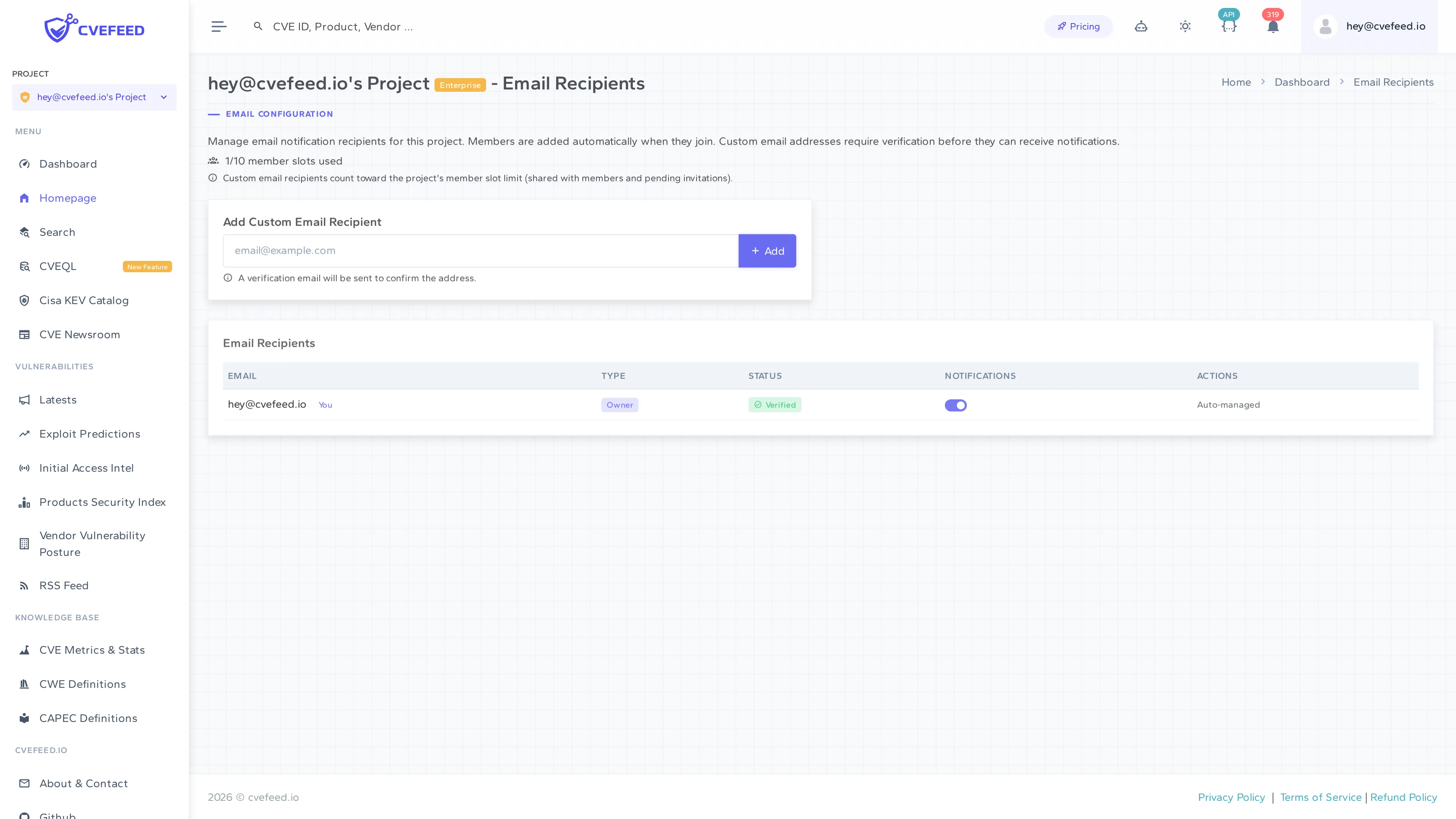
Section titled “Managing Recipients”Navigate to your project’s Email Recipients page from the integrations section.
Automatic Recipients
Section titled “Automatic Recipients”Project members are automatically added as email recipients when they join the project. Their entry shows:
- Email — the member’s email address (with a “You” badge for your own email).
- Type — a badge showing their project role (Owner, Admin, or Member).
- Status — verification status (project members are automatically verified).
- Notifications — a toggle to enable or disable email alerts for that member.
- Actions — “Auto-managed” for project members (they can’t be manually removed from this list; remove them from the project instead).
Custom Email Recipients
Section titled “Custom Email Recipients”Project admins and owners can add external email addresses that aren’t associated with project members. This is useful for sending alerts to shared mailboxes, security distribution lists, or colleagues who don’t need full project access.
To add a custom recipient:
- Enter the email address in the Add Custom Email Recipient field.
- Click + Add.
- A verification email is sent to the address. The recipient must click the verification link before they’ll receive any alerts.
Custom email recipients count toward the project’s member slot limit (shared with actual members and pending invitations).
Notification Toggles
Section titled “Notification Toggles”Each recipient has a notification toggle. Turn it off to temporarily stop sending alerts to that address without removing the recipient entirely. Turn it back on to resume delivery.
Email Content
Section titled “Email Content”Each alert email includes:
- CVE ID and affected product in the subject line — for example,
[CVEFeed.io] - New Vulnerability Alert! CVE-2026-76047 issued for a Google > Chrome. - Affected vendor and product, the CVSS score and severity rating, and the CVE’s publication date. The full CVE description is not included — follow the link to read it.
- Direct links to the CVE, the affected product page, and your project alerts on CVEFeed.io.
Ransomware-linked CVEs receive a distinct email with different styling emphasizing the CISA confirmation of known ransomware campaign usage.
Deduplication
Section titled “Deduplication”Standard alert emails and daily digests are deduplicated per recipient, per project. Once a recipient has been sent a notification for a specific CVE + product combination in a project through either of those channels, that delivery is recorded and the alert is not sent to the same address again, even if the alert is re-processed. An address that receives alerts for two projects still gets one email from each. Alerts beyond a digest’s 20-alert limit are not recorded as delivered, so they remain eligible for a later digest.
Ransomware alerts are the exception. They are a separate email type and are not recorded as deliveries, so an alert that already triggered a ransomware email can still appear in that recipient’s next daily digest, and re-processing a ransomware alert sends the email again.