
Subscriptions
A product subscription links your project to a specific software product from the CPE dictionary. When a new CVE is published that affects a subscribed product, CVEFeed.io creates an alert and delivers it through your configured notification channels.
Subscriptions are managed through the Tech Stack Management page within each project. This is where you build an inventory of the software your organization relies on.
Adding Subscriptions
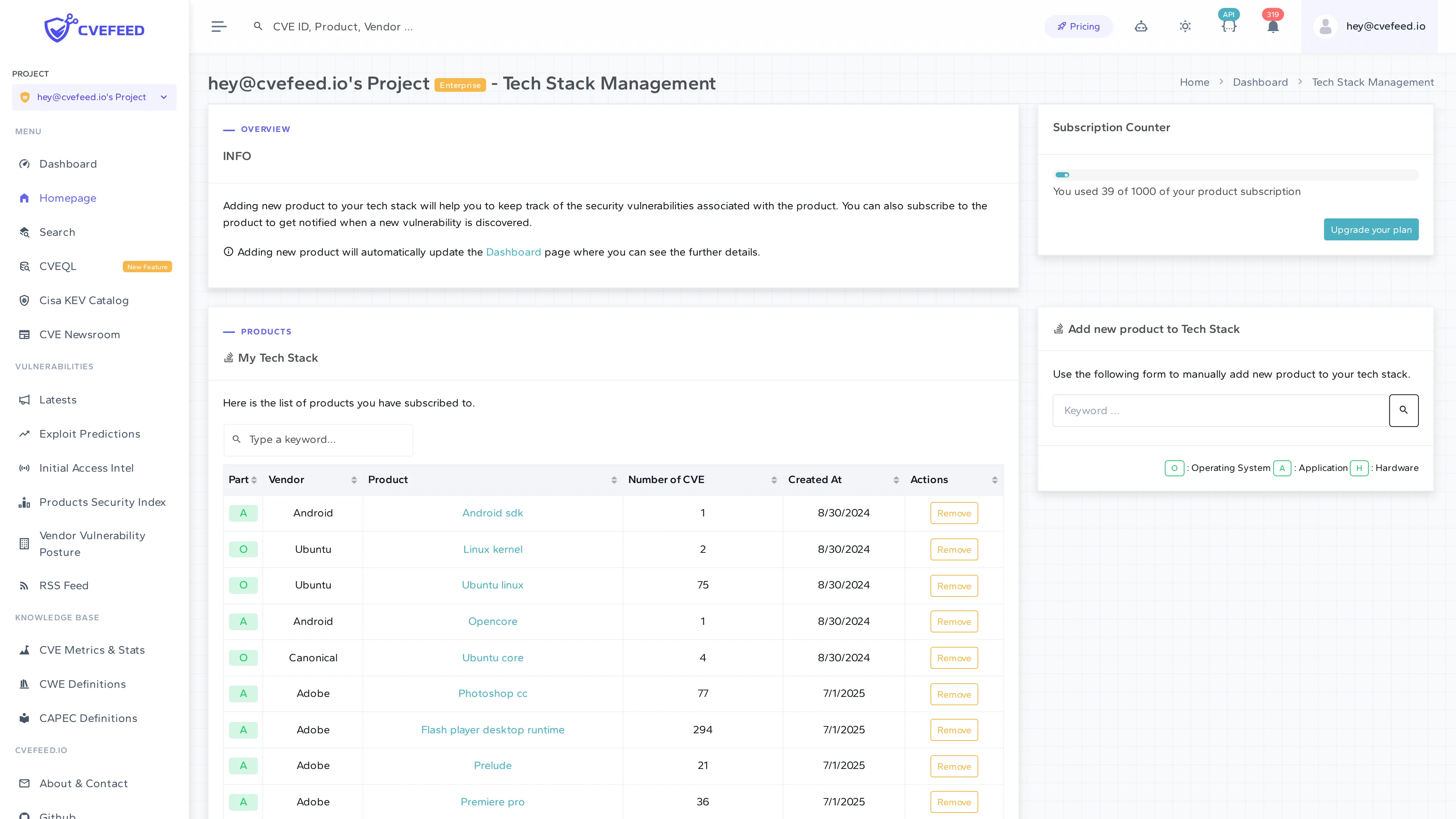
Navigate to Tech Stack Management from your project’s sidebar. The page shows your current subscriptions in the My Tech Stack table, along with the Add new product to Tech Stack form.
To subscribe:
- Use the search form on the right side of the page.
- Enter a keyword to search by vendor or product name (e.g., “apache”, “linux”, “adobe”).
- You can filter by type — Operating System, Application, or Hardware.
- Select the product from the search results.
- Click Subscribe.
The product appears in your My Tech Stack table immediately. The table shows the vendor, product name, number of associated CVEs, and the date you subscribed.
How Subscriptions Trigger Alerts
When a new CVE is published and linked to a product, CVEFeed.io checks all product subscriptions across every project that monitors the affected product. For each matching subscription, an alert is created (deduplicated by project + vulnerability + product, so you never get duplicates). This triggers the notification pipeline — delivering alerts via email, webhook, Slack, and Jira based on your configured channels.
Subscription Limits
Product subscriptions are not counted per project. They are counted across all projects owned by the same user and checked against a single tier limit. This is an important distinction when you own multiple projects.
For example, consider a user on the Starter tier (20 subscriptions, up to 3 projects):
Owner: [email protected] (Starter tier)Subscription limit: 20 total across all owned projects
├── Project "Backend Services"│   ├── apache / http_server│   ├── linux / linux_kernel│   └── redis / redis                    = 3 subscriptions│├── Project "Frontend Apps"│   ├── nodejs / node.js│   ├── microsoft / typescript│   └── facebook / react                 = 3 subscriptions│└── Project "Client Portal"    ├── apache / tomcat    └── oracle / mysql                   = 2 subscriptions
Total used: 8 / 20
If Alice tries to add a subscription in any of her projects, the platform checks whether her total count across all projects (8) is below her tier limit (20) — not whether the individual project has room.
| Tier | Max projects | Total subscriptions (across all owned projects) |
|---|---|---|
| Free | 1 | 10 |
| Starter | 3 | 20 |
| Pro | 5 | 100 |
| Enterprise | 10 | 1,000 |
The Subscription Counter on the Tech Stack Management page shows your current usage (e.g., “You used 39 of 1000 of your product subscription”).
Removing Subscriptions
Click Remove next to any product in the My Tech Stack table to unsubscribe. You’ll stop receiving new alerts for that product going forward, but existing alerts and vulnerability data are retained.
Tech Stack Dashboard
The Tech Stack Dashboard (accessible from the sidebar) provides an overview of your subscribed products: total vendor and product counts, CVEs discovered in the last 90 days, known exploited vulnerabilities from CISA KEV that affect your subscriptions, and a breakdown of subscribed products by vendor.