
API Tokens
API tokens provide programmatic access to CVEFeed.io. Each token is scoped to a single project and can be restricted to specific resources at read or write permission levels. Tokens are created by project admins or owners and can be used for CI/CD pipelines, SIEM integrations, or custom automation.
Token Format
Tokens follow the format:
cvefeed_{prefix}_{secret}For example: cvefeed_B7gvgDVu_fac81a213b38584be7cc7c7287132cb920f0c36a...
- Prefix (8 characters) — visible in the UI so you can identify which token is which without exposing the full secret.
- Secret — cryptographically generated. Never stored in plaintext.
- The token is shown once at creation and cannot be retrieved afterward. Make sure to copy it immediately.
Managing Tokens
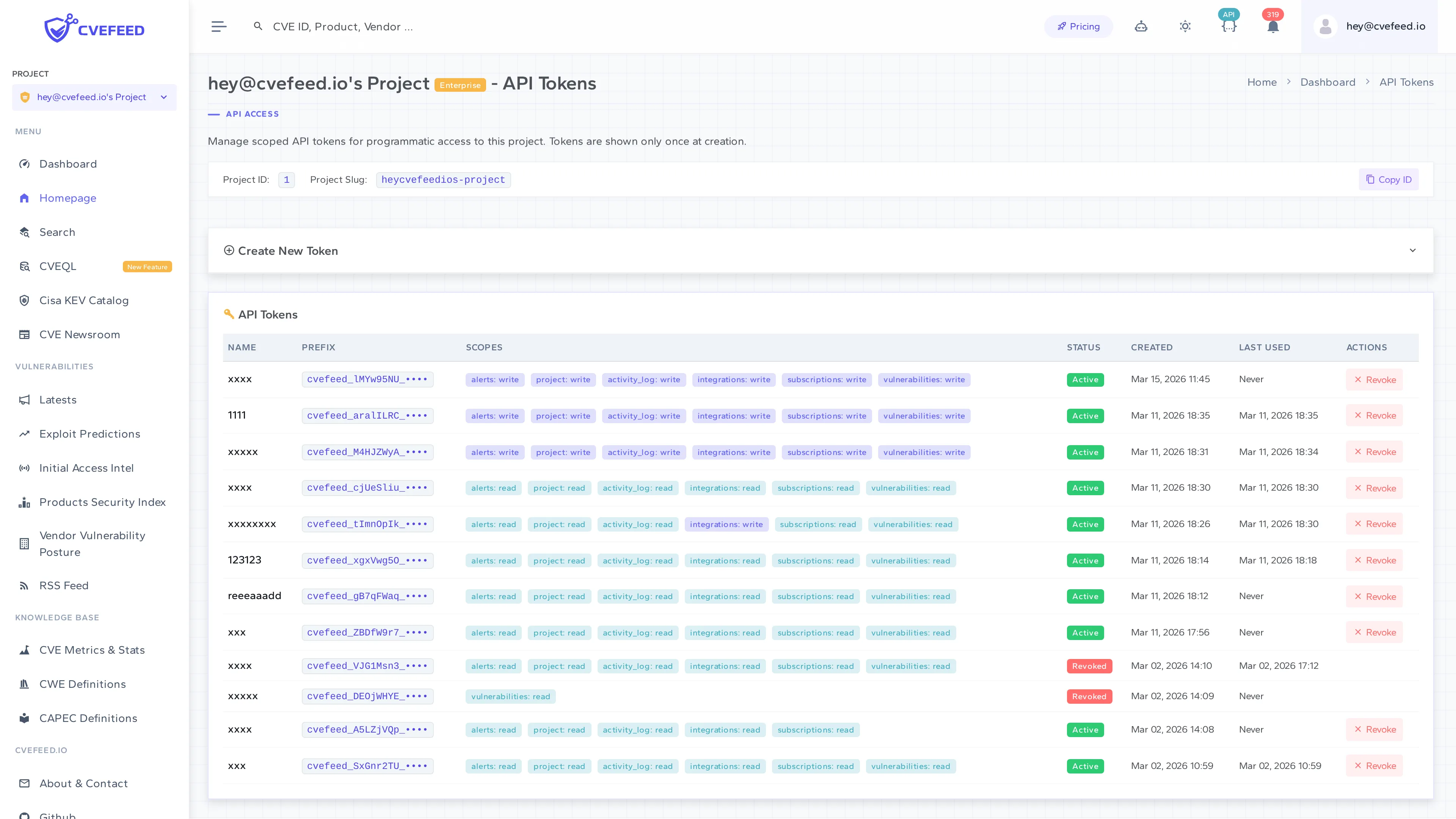
Navigate to your project’s API Tokens page (admin or owner access required). The page shows all tokens with their name, prefix, scopes, status, creation date, and last used timestamp.
Creating a Token
- Expand Create New Token at the top of the page.
- Enter a descriptive name (e.g., “CI/CD Pipeline”, “SIEM Integration”).
- Set the scope for each resource — choose
none,read, orwriteper resource. At least one resource must have read or write access. - Optionally set an expiration date. Tokens without an expiration remain valid until manually revoked.
- Click Create.
The raw token is displayed once in a modal. Copy it immediately — it cannot be shown again.
Revoking a Token
Click Revoke next to any active token. Revocation is immediate — any subsequent API request using that token will receive a 401 error. Revoked tokens are not deleted; they remain visible in the list with a “Revoked” status badge for audit purposes.
Token Scopes
Each token’s access is controlled by resource scopes. A scope defines what a token can access (the resource) and how (the permission level).
Resources
| Resource | What it controls |
|---|---|
vulnerabilities | Query CVE data via the API |
subscriptions | Manage product subscriptions |
alerts | View and mark alerts as read |
integrations | Manage webhooks and other integrations |
activity_log | Read the project’s audit log |
project | Access project settings and metadata |
Permission Levels
| Level | Rank | Meaning |
|---|---|---|
none | 0 | No access to this resource |
read | 1 | Read-only access (GET requests) |
write | 2 | Full access — includes both read and write (GET, POST, PATCH, DELETE) |
Levels are hierarchical: write implies read. When an API endpoint checks for read permission, a token with write on that resource will pass.
Scope Enforcement
Every API endpoint declares a required scope resource. The platform checks the token’s scope for that resource against the required level based on the HTTP method:
- GET, HEAD, OPTIONS → requires
read - POST, PATCH, PUT, DELETE → requires
write
If an endpoint does not have a scope resource configured, token requests are denied by default (fail-closed design).
Authentication
Include the token in the Authorization header:
curl -H "Authorization: Bearer cvefeed_B7gvgDVu_fac81..." \ https://cvefeed.io/api/projects/{project_id}/vulnerabilities/How Authentication Works
- The platform extracts the
Bearertoken from theAuthorizationheader. - The token is validated against the stored credentials.
- If the token is expired or revoked, authentication fails with a descriptive error message.
- On success, the token’s project is set as the request context, and all permission checks use the token’s scopes.
Usage Tracking
Each successful authentication updates the token’s last_used_at timestamp and last_used_ip address. This is visible in the token list on the UI.
Activity Logging
Token lifecycle events are recorded in the project’s activity log:
- Token created — logs the token name and prefix.
- Token revoked — logs the token name and prefix.
Actions performed via token authentication are also logged, with the token’s metadata recorded instead of a user actor.